 my
Business and individual customer records
MYOB business customers become Zoho Accounts; individuals become Contacts. MySync custom fields hold the MYOB identity and, when selected, financial summaries.
MYOB SYNC / CRM
Connect Zoho CRM and MYOB AccountRight to synchronise customer records, export your product catalogue and review won deals for accounting.
Built by MySync · Australian support · Choose your data flows
HOW THE DATA CONNECTS
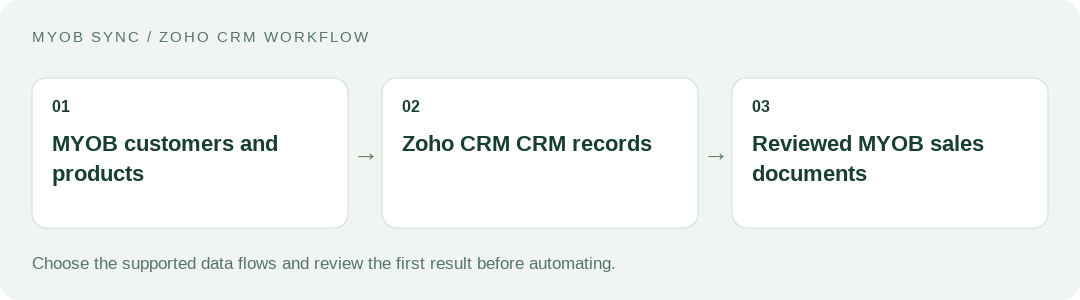
Zoho CRM relationships and MYOB accounting, connected through records your team can review. Choose the source records, review the destination and decide what should run automatically.
FEATURES AND POSSIBILITIES
MYOB business customers become Zoho Accounts; individuals become Contacts. MySync custom fields hold the MYOB identity and, when selected, financial summaries.
Keep supported names, email, phone and address fields in the selected CRM record. Invalid source data is identified rather than silently accepted.
Company-name and contact-email candidates require review. MySync custom fields must be available and writable; required custom fields or layouts can prevent a destination record being created.
When a managed value changes in Zoho CRM, MySync can hold the record for review rather than replace the edit without approval. Stored source/destination links support repeat exports without creating another record.
Export active MYOB sale items to Zoho CRM, including item name, SKU/code, description and a non-negative tax-exclusive base selling price. Existing SKU matches need an explicit link.
Optionally add the current MYOB customer balance and latest invoice reference, total, amount due and status to the linked CRM customer. These are summary fields, not another set of CRM invoices.
The configured MYOB accounting currency and the connected CRM currency must match before product exports or financial summaries are enabled. MySync does not silently apply an exchange rate.
CRM product exports carry catalogue information. They do not synchronise warehouse quantities, publish storefront listings or allocate MYOB inventory.
Turn an approved Zoho closed-won deal total into a MYOB service quote, sales order or invoice without recreating a complete product subform.
The final gross deal amount becomes one service line. Use a tax-inclusive total and one selected MYOB income account and sales tax code. The standard Closed Won stage is supported across pipelines.
Use an associated CRM record already linked to a MYOB customer, or deliberately select a fallback customer. Choose an active income account, sales tax code and document type. MySync does not silently create a new MYOB customer.
Import a deal first, inspect its customer, amount, date and tax, then approve the current preview. A source change requires a new import and review. Scheduling never approves sales documents automatically.
Stable CRM deal references are checked across MYOB invoices, orders and quotes. An uncertain write stays on hold for reconciliation; the app does not simply submit the same sale again.
Enable customer, product, summary and deal-import flows separately. Begin with a representative sample and review its result before expanding the connection.
Save a timing selection with at least one enabled flow. Automatic runs export selected customer/product data and capture deals for review; financial approval remains a separate step.
Use record-level results and Sync history to distinguish an imported record, a completed export, a skipped source and a transfer requiring review.
Plus includes all currently supported CRM flows, manual and scheduled runs, matching and transfer history. There is no separate inventory or Pro tier for this connection.
BEFORE YOU CONNECT
Decide which MYOB customer should own each Zoho CRM relationship. Clean up ambiguous names and shared email addresses before approving destination links.
A closed won deal is an opportunity to review a sale, not evidence of a payment. Decide whether your business first needs a quote, a sales order or an invoice.
Assign someone to check source changes, currency differences, custom-field requirements and uncertain financial outcomes. Automation is useful when the team also knows how to review exceptions.
PLANS AND OWNERSHIP
Free access lets you connect accounts and review available data. Plus is AUD28 per month and includes every supported CRM flow, with a 14-day trial on a new paid subscription. Provider subscriptions are separate.
Manage the connection, selected data flows and subscription from your app. Provider fees and subscriptions are separate from MySync. Connecting or disconnecting a provider is a different action from managing billing.
COMMON QUESTIONS
No. It exports customer/product information and supports reviewed service sales documents. It does not maintain CRM inventory quantities or post MYOB stock movements.
No. Deals are imported for review. You must preview and approve each financial transfer, even when imports run on a schedule.
No customer payment is created by the CRM transfer flow. Payment collection and reconciliation remain separate from creating a sales document.
MySync holds an unapproved match for review. Link the intended destination record explicitly before allowing managed updates.
No. There is one paid Plus plan at AUD28/month, including all currently supported CRM flows. Free connection and review access is also available.
Use an online MYOB AccountRight company file, or an eligible MYOB Business file exposed through the same MYOB API, with the customer, inventory, sales or banking capabilities your chosen flows need. The MYOB brand or plan name alone does not establish compatibility. Contact MySync if you are unsure about your company file.
MySync builds and supports this connection. Contact support@mysync.io for compatibility and setup questions. Read our privacy policy and terms and conditions.
All MYOB Sync apps · All MySync integrations · Integration guides
LET’S CONNECT
Explore your app, review its features and choose the workflow your business needs.