 my
Invoice imports and accounting
Capture Stripe invoices and review customer, line, currency, tax and payment evidence before transferring supported invoices to MYOB.
MYOB SYNC / PAYMENTS
Bring Stripe invoice and payment activity into MYOB, with separate treatment of processing fees, refunds and net payouts instead of treating bank deposits as sales.
Built by MySync · Australian support · Choose your data flows
HOW THE DATA CONNECTS
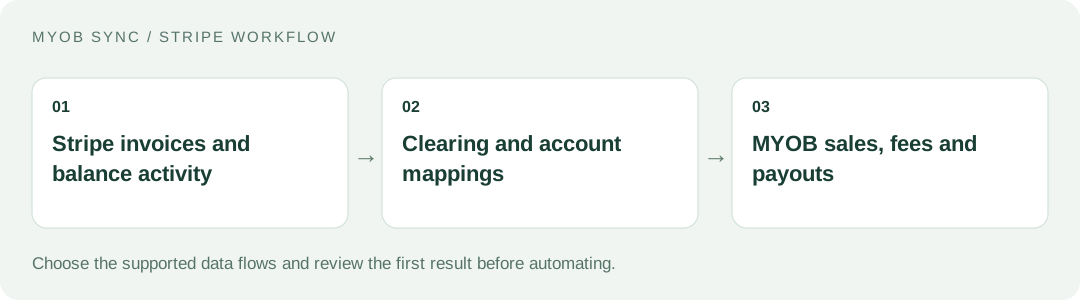
A clearer path from the customer’s gross payment to the amount deposited in your bank. Choose the source records, review the destination and decide what should run automatically.
FEATURES AND POSSIBILITIES
Capture Stripe invoices and review customer, line, currency, tax and payment evidence before transferring supported invoices to MYOB.
Supported payment allocations settle the matching invoice. An invoice-funded payment is not also treated as a second standalone sale.
Use explicitly selected receipt rules for supported payments that are not represented by an imported invoice. Avoid duplicating revenue recorded by a commerce integration.
Capture credits and refund evidence, apply supported accounting treatment and keep ambiguous or unsupported allocations visible for review.
Keep customer gross receipts distinct from processing charges and net payout amounts. A payout is a movement of funds, not a new sale.
Post supported Stripe fee amounts to the selected MYOB expense account through the configured clearing account.
Record supported paid payouts from clearing to the mapped bank account and review how the balance activity explains the net deposit.
Currency, tax, allocation and source-evidence checks keep unexplained balances or uncertain writes from being blindly retried.
Inspect imported invoices, customers, payments and financial records alongside transfer results and run history.
Start with read-only imports and a small reviewed transfer. Schedule only the financial flows and mappings you have chosen.
BEFORE YOU CONNECT
List the systems already creating MYOB sales. Decide whether Stripe invoices or your storefront should own each sale before activating payment and standalone-receipt flows.
Document the gross receipt, processing expense and eventual bank transfer. This makes a net deposit explainable without reducing reported sales by the fee.
Use a period broad enough to include the payment and its later payout. Daily sales totals do not necessarily match the deposits received on that date.
PLANS AND OWNERSHIP
Check Account & help for the current Stripe app plans, included financial flows and monthly AUD billing. Choose a plan only after reviewing which records your business needs to post.
Manage the connection, selected data flows and subscription from your app. Provider fees and subscriptions are separate from MySync. Connecting or disconnecting a provider is a different action from managing billing.
COMMON QUESTIONS
No. Supported payouts are transfers from the configured clearing account to the bank; sales and receipts are handled separately.
Yes, when the accounting responsibilities are clearly separated. Avoid creating a second sale or receipt for revenue already recorded by the store integration.
Use an online MYOB AccountRight company file, or an eligible MYOB Business file exposed through the same MYOB API, with the customer, inventory, sales or banking capabilities your chosen flows need. The MYOB brand or plan name alone does not establish compatibility. Contact MySync if you are unsure about your company file.
MySync builds and supports this connection. Contact support@mysync.io for compatibility and setup questions. Read our privacy policy and terms and conditions.
All MYOB Sync apps · All MySync integrations · Integration guides
LET’S CONNECT
Explore your app, review its features and choose the workflow your business needs.