 my
Read-only transaction imports
Capture the selected reporting period for review without creating accounting entries. Review transaction type, status, currency and signed amounts.
MYOB SYNC / PAYMENTS
Import PayPal transaction reports, review payments and fees, and transfer supported receipts, withdrawals and refunds to MYOB using an explicit clearing-account workflow.
Built by MySync · Australian support · Choose your data flows
HOW THE DATA CONNECTS
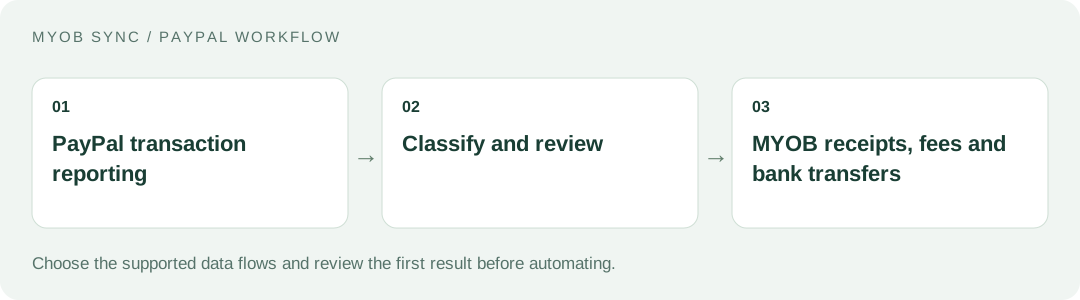
Understand the difference between PayPal payment activity, charges and money transferred to your bank. Choose the source records, review the destination and decide what should run automatically.
FEATURES AND POSSIBILITIES
Capture the selected reporting period for review without creating accounting entries. Review transaction type, status, currency and signed amounts.
Reports are imported in bounded date windows with saved page progress. Reporting can lag actual activity; allow time for recent events to appear.
Use captured transaction records and CSV export to investigate exceptions and reconcile source activity before posting.
Retry reporting access or update saved credentials without repeatedly re-entering a secret after a failed verification.
Supported successful incoming payments can settle an explicitly linked MYOB invoice. Optional exact-reference matching requires a unique result.
Choose Receive Money treatment for supported unmatched income only when another integration has not already recorded the sale. Review is the default for unmatched payments.
Record supported embedded and separate fees against the PayPal clearing account and chosen expense mapping. Eligible fee credits have separate treatment.
Supported withdrawals move funds from clearing to the selected bank account, without recording the deposit as new sales revenue.
Supported refunds use a linked MYOB credit note or reverse an eligible standalone receipt created by this connector. Other cases remain in review.
Financial event identity and saved transfer evidence distinguish imported, posted, changed and uncertain records.
Choose the supported accounting flows, save mappings, test a manual export and then enable an eligible schedule.
BEFORE YOU CONNECT
Identify which entries are customer receipts, fees and withdrawals. A bank withdrawal is not evidence of a second sale.
Use invoice settlement when MYOB already holds the sale. Use a standalone receipt only for genuinely unrecorded income with an appropriate mapping.
Choose a reporting cut-off that gives PayPal time to expose recent activity. An empty immediate report does not prove that an expected payment failed.
PLANS AND OWNERSHIP
Free supports manual reporting imports, review and CSV. Basic is AUD 14/month for supported manual accounting exports. Plus is AUD 28/month for schedules and supported refunds and fee credits. Paid plans include a 14-day trial; current checkout options are shown in the app.
Manage the connection, selected data flows and subscription from your app. Provider fees and subscriptions are separate from MySync. Connecting or disconnecting a provider is a different action from managing billing.
COMMON QUESTIONS
Yes, for this Transaction Search connection the PayPal Business account owner creates a Live REST app and supplies its own reporting credentials.
Confirm that the connection uses Live credentials and that Transaction Search is enabled for that REST app. Newly enabled permissions can take up to nine hours to reach tokens; retry the saved connection after propagation.
Use an online MYOB AccountRight company file, or an eligible MYOB Business file exposed through the same MYOB API, with the customer, inventory, sales or banking capabilities your chosen flows need. The MYOB brand or plan name alone does not establish compatibility. Contact MySync if you are unsure about your company file.
MySync builds and supports this connection. Contact support@mysync.io for compatibility and setup questions. Read our privacy policy and terms and conditions.
All MYOB Sync apps · All MySync integrations · Integration guides
LET’S CONNECT
Explore your app, review its features and choose the workflow your business needs.