 my
Customer profile exports
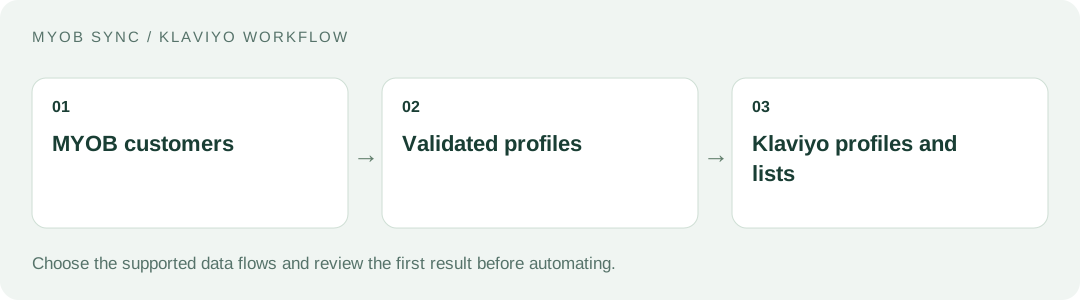
Send customer names, business details, email, supported phone and address fields from MYOB to Klaviyo. Keep accounting as the source of the selected contact details.
MYOB SYNC / MARKETING
Export MYOB customer records to Klaviyo profiles and optional lists, with visible sync results and control over the customer data you share.
Built by MySync · Australian support · Choose your data flows
HOW THE DATA CONNECTS
An accounting customer list that can support your marketing team without re-entering contact details. Choose the source records, review the destination and decide what should run automatically.
FEATURES AND POSSIBILITIES
Send customer names, business details, email, supported phone and address fields from MYOB to Klaviyo. Keep accounting as the source of the selected contact details.
Use email-based profile matching and stored destination identifiers so subsequent runs update the linked profile rather than blindly creating another contact.
Choose an existing destination list when the workflow needs one. List membership and consent to receive marketing are separate decisions.
Invalid email addresses and unsupported phone formats are identified before transfer. Missing source fields do not clear existing profile information.
Review the customer preview and decide whether inactive contacts should be excluded before running a transfer.
Run a customer export when required or select an eligible hourly or daily schedule after enabling the customer flow.
Saved profile links and payload fingerprints let unchanged customers be skipped and successful records retained when a later record needs attention.
Review Sync history, record notes and counts to see what was exported, skipped or rejected.
BEFORE YOU CONNECT
Identify the MYOB file holding the customer records you want in Klaviyo. Consolidate duplicate or shared email addresses before deciding which contacts should represent a customer.
Decide which team manages subscriptions and suppression. A completed accounting sale does not automatically grant permission for promotional email.
Compare valid, exported, unchanged and skipped profiles rather than judging success only by the total number of contacts.
PLANS AND OWNERSHIP
Customer Sync is AUD 9 per month with a 14-day trial. Manual and scheduled customer exports use the same plan.
Manage the connection, selected data flows and subscription from your app. Provider fees and subscriptions are separate from MySync. Connecting or disconnecting a provider is a different action from managing billing.
COMMON QUESTIONS
No. Profile creation and optional list membership do not subscribe someone to email or SMS marketing. Manage consent using an appropriate Klaviyo consent process.
No. MYOB Sync for Klaviyo reads MYOB customer cards. Klaviyo Sync for Neto is a separate integration for Neto customer, order, event and catalogue workflows.
Use an online MYOB AccountRight company file, or an eligible MYOB Business file exposed through the same MYOB API, with the customer, inventory, sales or banking capabilities your chosen flows need. The MYOB brand or plan name alone does not establish compatibility. Contact MySync if you are unsure about your company file.
MySync builds and supports this connection. Contact support@mysync.io for compatibility and setup questions. Read our privacy policy and terms and conditions.
All MYOB Sync apps · All MySync integrations · Integration guides
LET’S CONNECT
Explore your app, review its features and choose the workflow your business needs.